“Self-Restructuring VIP Shoppers”
Please note that network structure changes will be reflected in your Online Office reports one day after changes are made.
How It Works:
Between the 1st and 10th of the month, you may move any of your VIP Shoppers who joined in the previous month to a position directly under any existing IBO or VIP Shopper within your own network. However, the IBO or VIP Shopper who will become the new “sponsor position” must have joined in the same month as, or earlier than the VIP Shopper who is being moved and placed under him or her. (Note: This feature is subject to country rules. Some countries may have different rules that VIP can only be adjusted under another VIP and not existing IBOs.)
Step by Step Guide:
1. For US/UK/NZ: To view your immediate VIPs, click on the “Self-Restructuring VIP Shoppers” link on the menu bar is on the left under “My Profile”. VIPs who are within the eligible restructuring period will have links to proceed.
For others: To view your immediate VIP Shoppers click on the “Self-Restructuring VIP Shoppers” link on the top menu bar under “My Profile”. VIP Shoppers who are with eligible restructuring period will have links to proceed.
2. You can then VIEW & RESTRUCTURE your VIP shopper.
Example:
Your BO ID is 888888 and your immediate VIP Shoppers are:
- VIP284455 joined in November 2009
- VIP284456 joined in November 2009
- VIP284460 joined in November 2009
- VIP284457 joined in November 2009
- VIP280241 joined in December 2009
- VIP281258 join in January 2010
- VIP250428 join in January 2010
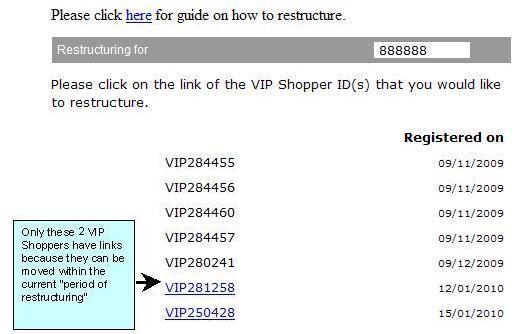
b) RESTRUCTURE – Click on the link of the downline you would like to restructure.
You will see a screen like this:
Example
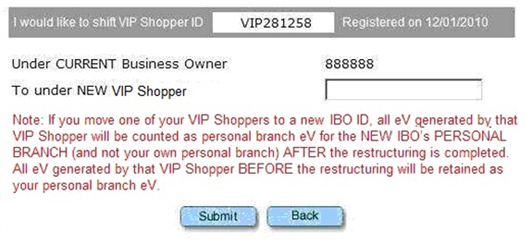
3. Type in the ID of the new sponsor and click “Submit”.
4. The system will then check to see if the move is allowed.
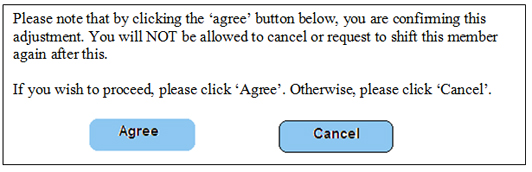
5. If the move is allowed, you will then see a pop up message. Read carefully so that you clearly understand the message and click ‘Submit’ to continue or ‘Cancel’ to go back.
6. If the move is not allowed, you will see an error message and be brought back to the previous page to enter another ID.
7. Please ensure that you understand your network structure and how your changes will affect your network performance before making any adjustments. Once an adjustment is done, you will NOT be allowed to cancel it or request another adjustment.
8. Your structure changes will be reflected in your Online Office reports one day after changes are made. Changes do not show up immediately.