“Self-Restructuring” Feature
Please note that network structure changes will only be reflected in your Online Office reports one day after changes are made.
How It Works:
Between the 1st and 10th of the month - You may move any immediate downline Business Owner that joined in the previous month to a position directly under any existing Business Owner within your own network as long as the new “sponsor position” or upline Business Owner joined in the same month as, or earlier than, the Business Owner that is being moved underneath him or her.
Profit calculation will be based on the new structure for the previous month onwards.
Step by Step Guide:
1. After you click on “Restructure Immediate Downlines” link on the side menu bar, you will be brought to a page displaying all your immediate downlines. Those that are within the eligible restructuring period will have links. This will depend on when you log in to use this feature.
2. You can then View & Restructure your downlines.
Example:
You (ID: 888888) have immediate downlines:
- 223456 joined in April
- X047603 joined in May
- 429875 joined in June
- 567048 joined in June
- X485734 joined in July
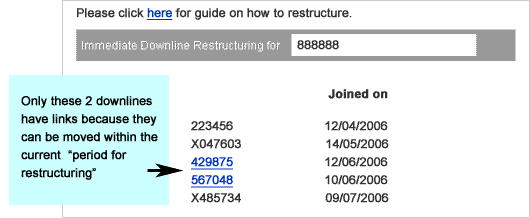
b) DECIDE & RESTRUCTURE – Click on the link
for the downline you would like to restructure.
You will see a screen like this:.
Example
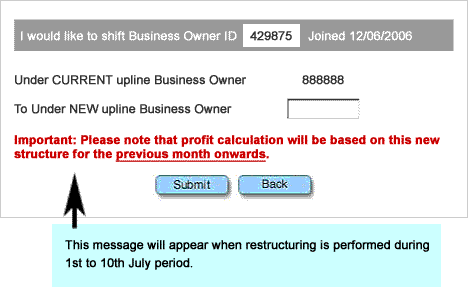
3. Type in the ID where you would like your downline moved to, and click Submit.
4. The system will then check to see if the move is allowed.
5. If you enter an invalid ID or an ID that does not meet the system’s criteria, you will see an error message, and be brought back to the page to enter another ID.
Your structure changes will only be reflected in your
Online Office reports one day after changes are made.